
Cast planning guide · By Mii Planner
Who Should I Add to My Tomodachi Life Island?
You have added yourself and a few friends. Now you are staring at the next empty slot. Instead of collecting a long list of famous names, start with a small group you would actually enjoy following.
This guide helps you choose residents for Tomodachi Life: Living the Dream, write a simple character idea, and organize it in Mii Planner. The six-person example below is a creative starting point, not an optimal lineup or a game requirement.
1. Choose a direction before choosing more names
Write down three people or characters you already want on the island. Look for a shared starting point: your real friend group, a family, a favorite fictional cast, or your own original characters. You can mix them later; a direction simply makes the next decision easier.
- Friends: start with yourself, a close friend, and someone with a contrasting temperament.
- Family: choose people you want to recreate and give each a recognizable habit or interest.
- Fictional or original characters: pick a small ensemble you care about instead of trying to include an entire series.
For an outside source of inspiration, Nintendo has published examples of characters to add. Our approach here focuses on deciding who fits your own cast.
2. Give each resident a one-sentence idea
Use this prompt: “I want to add [name], who is [one trait], because [a reason I would enjoy having them here].” For example: “I want to add Riley, a thoughtful puzzle fan, because most of my current picks are loud performers.”
That sentence gives you something useful to put in the profile notes. Choose a personality direction afterward. The personality chart lets you compare types; the calculator helps you explore a slider setup. You do not need equal numbers of every personality category.
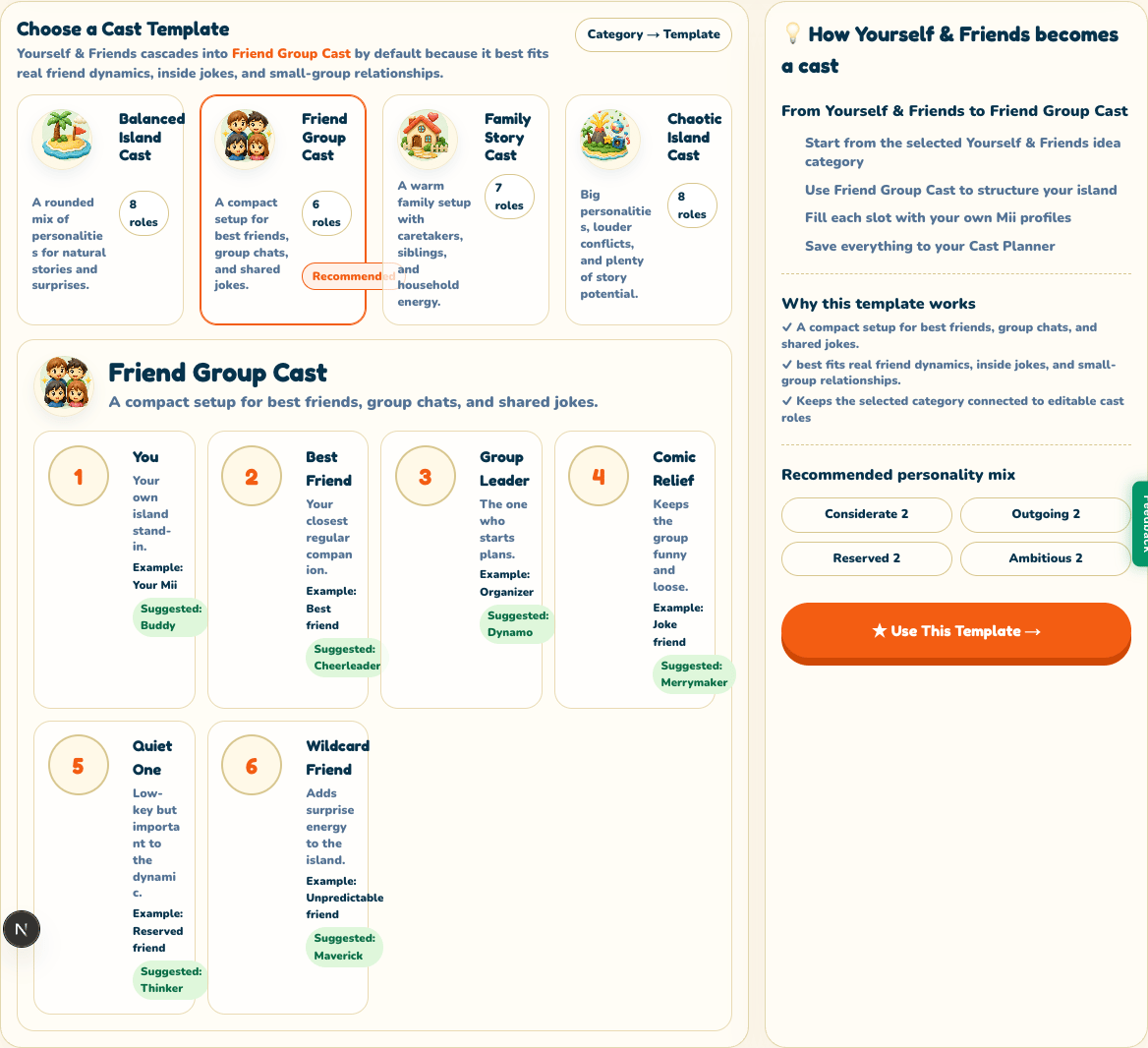
3. Try this six-person friend-group cast
These fictional names follow the six roles in our Friend Group Cast template. Replace them with your own choices. Personality matches are our creative suggestions, not claims that a type guarantees a particular behavior.
You
Alex
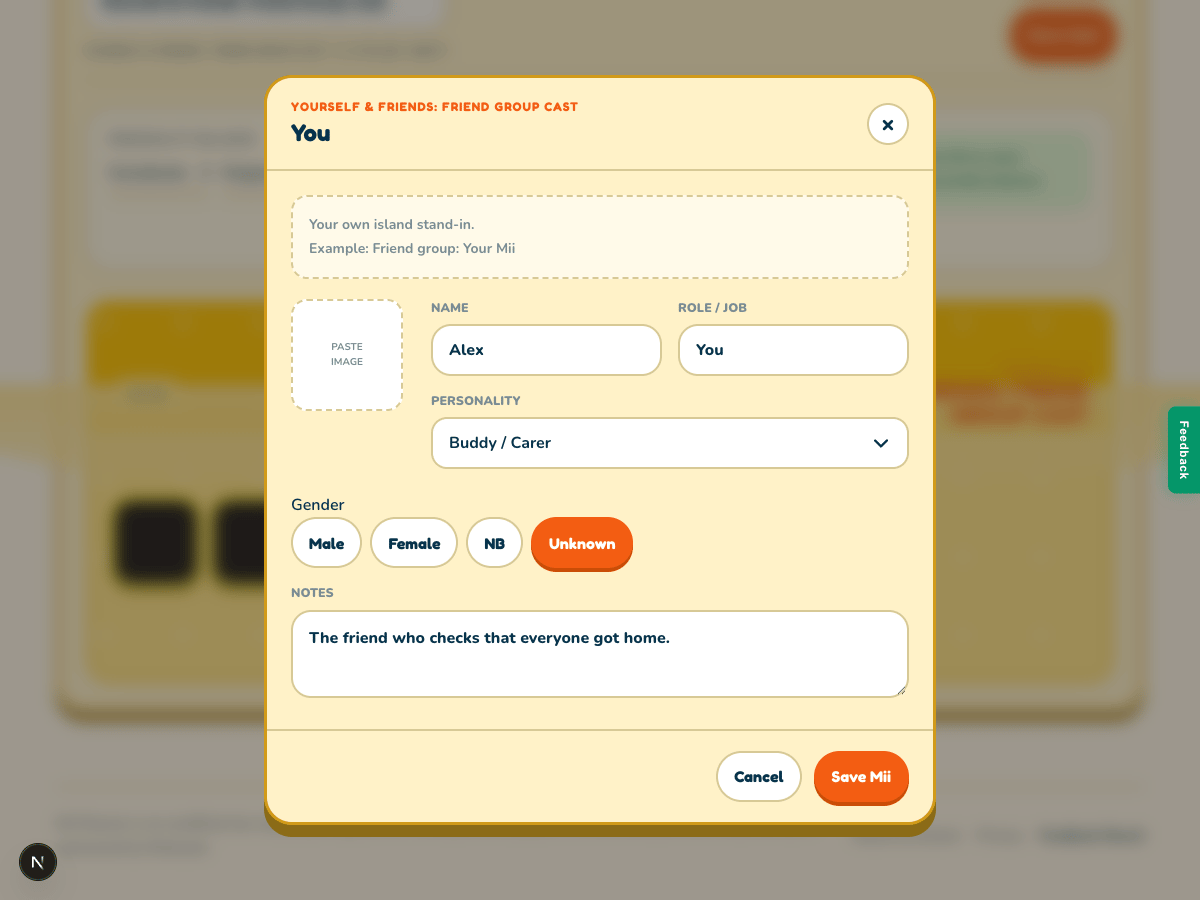
Buddy / CarerThe friend who checks that everyone got home. A familiar, considerate starting point for your island.
Best Friend
Sam
Cheerleader / OptimistAlways encourages a new hobby. Choose this direction if enthusiasm is the trait you want to remember.
Group Leader
Jordan
Dynamo / Hot-BloodedMakes the plans and gets everyone out the door. A more energetic contrast to Alex.
Comic Relief
Casey
Merrymaker / BubblyTurns an ordinary lunch into an occasion. Use a playful direction rather than simply copying the leader.
Quiet One
Riley
Thinker / ThinkerLoves puzzles and takes time to answer. A quieter character to contrast with the outgoing picks.
Wildcard Friend
Morgan
Maverick / HeadstrongThe independent friend with a surprising hobby. Keep one unusual pick if the group feels too familiar.
Do two picks feel interchangeable? Change a hobby, a personal reference, or a personality direction—or keep both if you enjoy them. “Balanced” here means a cast you find varied and memorable. It is not a compatibility score.
4. Turn your list into a saved cast
- Open Mii Ideas. Select Yourself & Friends and confirm Friend Group Cast is selected.
- Click Use This Template. This creates a cast with six empty role slots and opens it in Cast Planner. It does not automatically add Alex or the other example characters.
- Open an empty role slot. Enter a name, choose a personality and add your one-sentence note, then click Save Mii. Include who inspired the character in the note if useful. Repeat for the people you have chosen; you can leave other roles empty.
- Give the cast a title and click Save Cast. Review the personality counts as a planning aid, and return to edit your profiles when your ideas change.
What this plan can—and cannot—do
Roles such as Best Friend, Group Leader and Comic Relief are labels for your planning notes. They do not assign friendships, romances, rivalries or story outcomes inside the game. Mii Planner does not connect to your console, edit save data, or automatically import residents. Recreate your chosen Miis in the game yourself.
Your cast is saved in this browser using localStorage. There is no account or cross-device sync. Clearing site data, using a different browser, or closing a private browsing session can make the saved plan unavailable. Keep a separate copy of names and notes you cannot afford to lose.
Choose one resident, then build from there
You do not have to fill every slot today. Pick the next person you are excited to create, record what makes them memorable, and leave space for ideas that arrive while you play.
Choose a cast template →